


AlphaClean: Junk Cleaner
4.224.00 Reviews
App Specs
- Version
- V1.1.0
- Updated On
- License
- Free
- Downloads
- 1,000,000+
- Developer
- Ovifocus Limited
- Categories
- Tools
- Platform
- Android
Screenshots
 Analysis by AppCompare
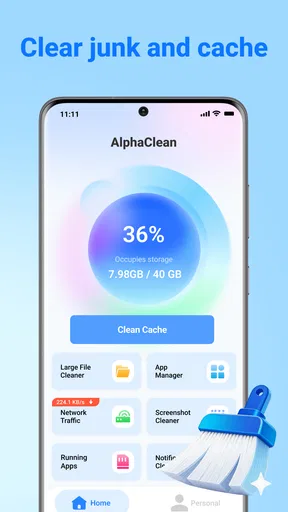
I approached AlphaClean: Junk Cleaner as a practical storage tool rather than a magic button for making a phone feel new. Developed by Ovifocus Limited, this free Android app sits in the tools category and is aimed at people who want a clearer way to deal with unwanted files and a crowded app list. Its basic promise is easy to understand: inspect the phone, identify material that may no longer be useful, and help the user reclaim space.
That sounds simple, but storage-cleaning apps can be surprisingly easy to misunderstand. A scan result is not automatically a list of files that should all be deleted, and a phone that is slow is not always suffering from a lack of free space. My experience with this kind of utility is that the most valuable part is not the final cleaning tap. It is the review step before it, where I decide what is genuinely disposable and what I may still need.
AlphaClean is currently listed as version V1.1.0, supports Android 7.0 and later, and carries an Everyone age rating. It has reached over a million installs and holds an average rating of 4.2 from around 1.2K ratings. Those figures suggest that it has found a broad audience, but they do not remove the need to use it carefully. I would recommend it most to someone who wants a focused maintenance tool, not to someone expecting it to repair every performance problem.
Where the first problems usually appear
I find the first trouble often comes from uncertainty, not from the scan itself: a result may look clear while leaving me unsure what a group contains. This section focuses on spotting that hesitation early and using it as a cue to pause rather than tap through. From there, a few small setup choices can make the next pass easier to follow.
Scanning is only the beginning
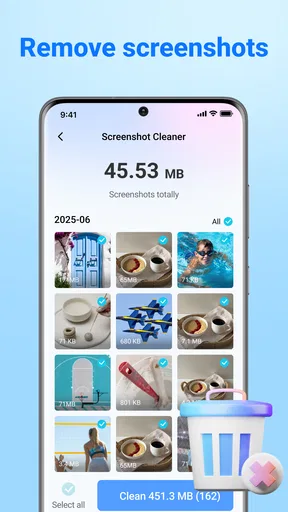
The first point where I would slow down is the scan result. A cleaner can group files into categories that look disposable, but the phone does not know the personal value of every item. A downloaded document, an old video, a duplicate-looking image, or a file left behind by an app may be unnecessary, or it may be something I intentionally kept.
That is why I would treat AlphaClean as a sorting assistant rather than an automatic decision-maker. If I open the result and review the categories before confirming anything, I have a much better chance of freeing space without losing something important. This is especially relevant on a phone used for work, study, travel, or family photos, where a file that looks like clutter may have a purpose.
A useful habit is to clean in small rounds. Instead of selecting everything after the first scan, I would start with the clearest group of unwanted items, complete that action, and then check the phone again. This makes it easier to notice whether the recovered space is actually useful and gives me a chance to stop if the results do not match what I expected.
Worth Reading Before You Choose

EA SPORTS FC Mobile 26 Is a Bigger Football Game, but It Takes Time

Flipboard Shows What News Apps Must Do Beyond the Feed

Switching to Android Auto Means Rethinking Your Driving Routine

Google Calendar Makes a Crowded Week Easier to Manage

Ludo King Makes the Most of the Minutes Between Plans

Baby Panda World Brings Quick Play to Modern Phones, but Its Game Library Feels Busy
Why the app may appear less effective than expected
Some users will open a cleaner after installing a large game, recording a long video, or downloading offline media and expect the app to remove that space immediately. In practice, those files may be personal content rather than junk. Deleting them would solve the storage problem, but only by removing something the user may want to keep.
AlphaClean is therefore more helpful when the problem is accumulated clutter: files left by everyday activity, items I no longer recognize, or an app collection that has become difficult to manage. It is less suitable when the main issue is a single large file that I deliberately saved. In that situation, the phone’s file manager, gallery, or the app that created the file may offer a safer and more direct solution.
Another source of confusion is expecting a cleaner to improve battery life or network speed. Freeing storage can make a phone easier to manage, but it does not automatically fix a weak signal, a worn battery, a damaged operating-system installation, or an application that is using too many resources. I would use AlphaClean for storage organization first and judge other improvements separately.
What I would check before removing anything
Before confirming a cleanup, I would ask three simple questions. Do I recognize the file or category? Could another app still need it? Would I be able to recover it if I changed my mind? If the answer to any of these is unclear, I would leave that item alone and deal with the obvious clutter first.
This cautious approach is not a criticism of the app. It is a sensible way to use any cleaner. The convenience of seeing possible junk in one place is valuable, but convenience should not replace judgment. The safest result comes from using the tool to narrow down the work, then making the final choice myself.
Setup checks that prevent avoidable friction
Before I begin, I like to make the phone’s immediate context predictable: finish downloads, avoid switching between several storage tasks, and decide what kind of space I am trying to recover. Those checks reduce the chance that changing files or a busy device will make the result confusing. The next section looks at how to make the first cleanup feel manageable, especially when the interface or process is unfamiliar.
Start with the phone’s current condition
When I install a maintenance app, I prefer to take a quick look at the phone before opening it. I check how much storage is available, whether a recent download caused the problem, and whether the device is behaving normally apart from the storage warning. This gives me a baseline. Without one, it is easy to assume that every improvement or problem came from the cleaner.
It is also worth closing unrelated tasks before beginning a scan. If the phone is downloading, updating, transferring photos, or recording media, the storage picture may change while AlphaClean is working. A scan taken during that activity may not reflect the final state. Waiting until the phone is relatively idle makes the result easier to understand.
Review the first screen instead of rushing forward
The opening experience of a cleaning app should be treated as an explanation of what it can inspect, not as a command to approve every action. I would read each prompt and screen carefully, especially if the wording is broad. The important distinction is between finding candidates for removal and deleting them.
If AlphaClean presents categories or groups of files, I would open them one by one. A category with a large apparent total deserves more attention than a small group, but size alone is not a reason to delete. A large folder may contain exactly the files I installed the app to keep. The practical benefit of the tool comes from making that review faster, not from making it unnecessary.
I would also avoid starting a cleanup while the phone is nearly full and under heavy pressure from another task. A device with very little free space can respond slowly, and that may make the app appear stuck even when the phone is simply struggling. Leaving the screen open and allowing the process time is safer than repeatedly tapping buttons or restarting immediately.
Keep the first session deliberately small
My preferred first session would be a test run with a limited selection. I would remove only items I can identify confidently, then return to the storage screen and compare the result. This creates a simple recovery path: if something behaves unexpectedly, I know which action came immediately before it.
That workflow is more useful than trying to perform a complete digital spring-cleaning in one sitting. It also helps answer a practical question many people have after installation: is the app finding the type of clutter that is actually causing my problem? If the answer is no, I would stop using it for that task rather than forcing the tool to become something it is not.
Compatibility is straightforward, but hardware still matters
AlphaClean supports Android 7.0 and later, so compatibility with the operating system is relatively broad. That does not mean every older phone will feel equally quick. Performance depends on the device, available memory, storage health, and how much else is running at the same time.
The app is free, which lowers the barrier to trying it. I still would not install it simply because the phone feels slow. I would first identify whether the storage is genuinely crowded. If the phone has plenty of free space and the main complaint is lag inside one particular application, the more appropriate fix may be updating, reinstalling, or troubleshooting that application directly.
Recovering from an interrupted or confusing workflow
If a workflow is interrupted, I would first establish what the phone actually completed instead of repeating the last action. Checking the storage view and reopening the relevant screen can help me distinguish a slow response from a finished cleanup. The following section turns to an equally important distinction: some symptoms that appear during a cleanup come from the device or another app, not the cleaner.
When a scan seems frozen
If a scan appears not to move, I would avoid pressing the same control repeatedly. First, I would wait briefly and check whether the phone is still responding elsewhere. I would also make sure another storage-heavy task is not running in the background. A large collection of files can take time to inspect, particularly on older hardware.
If the interface remains unresponsive, I would leave the app, reopen it, and begin again rather than repeatedly confirming a partial action. Before doing that, I would note what I had already selected. The goal is to prevent uncertainty about whether a cleanup completed, failed, or is still processing.
Restarting the phone is a reasonable general troubleshooting step if the entire device is slow, but I would not treat it as a special AlphaClean fix. A restart can clear a temporary system bottleneck, yet it will not correct a full storage drive, a failing battery, or a problem caused by another application.
When the result changes between sessions
Storage results can change naturally. An app may create temporary files again, a messaging service may download new media, or the system may update its own storage records. Because of that, two scans do not need to show exactly the same picture.
If the result changes dramatically, I would look at what I did between scans. Did I open a video service, download photos, install an update, or receive a large group of messages? This kind of comparison is one of the more useful ways to use a cleaner: not just to remove files, but to discover which everyday habit is refilling the storage.
A particularly practical workflow is to scan after a known storage event, such as finishing a large offline download. If the app identifies nothing relevant, I would manage that download from the service that created it. If the scan highlights accumulated leftovers, I would review those items separately. This avoids blaming AlphaClean for files it was never meant to manage.
When an unwanted item is removed
I would be cautious about assuming that every deleted item can be restored through the cleaner. Before confirming removal, I would check whether the file is already backed up or still available in the original app. For personal photos, documents, and recordings, I would make a copy first if there is any doubt.
After a cleanup, I would open the apps that matter most to me. A messaging app, document reader, gallery, or offline media app can reveal quickly whether the phone is behaving normally. This is a better check than relying only on a new storage number. The purpose of cleaning is to make the phone easier to use, not merely to produce a smaller file list.
When the app is not the cause
A storage utility can make a phone’s condition easier to inspect, but it cannot explain every slowdown, warning, or change in available space. I find it useful to compare the timing of a symptom with recent downloads, updates, or ordinary app use before deciding what to do next. That broader view helps set up a verdict based on fit rather than expectation.
Storage warnings can have several explanations
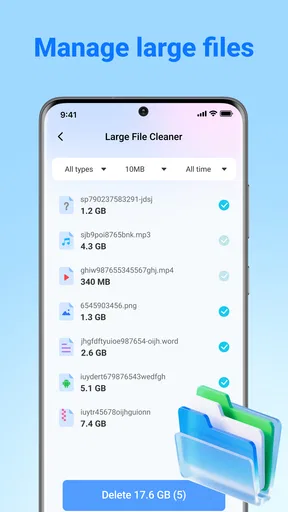
A phone may report low storage because of photographs, videos, downloads, application data, system files, or offline content. A cleaner can help organize some of that, but it cannot make personal media disappear without deleting it. If the largest category is content I want to keep, the real solution may be moving it to another safe location or removing it manually from the original service.
Likewise, if one application is consuming most of the space, I would inspect that application’s own settings before using a broad cleanup. Streaming and social apps often accumulate downloaded or cached material as part of normal use. Managing those files at the source can be more precise and may prevent the same issue from returning quickly.
Performance problems need a different diagnosis
AlphaClean is not the right answer for every slow-phone complaint. If the device overheats, restarts, loses signal, drains its battery unusually quickly, or freezes even with comfortable free storage, I would investigate those symptoms independently. Cleaning files may be harmless, but it could distract from a more important hardware or system issue.
There is also a trade-off with repeatedly cleaning temporary material. Some apps may recreate files they need, so removing them can lead to another download or a slower first launch. I would not run a cleanup as a daily ritual unless I had a specific storage reason. Occasional, targeted maintenance is more sensible than constantly trying to keep the phone at an artificially empty state.
How it compares with built-in tools
The built-in storage controls on Android are often the best choice when I want detailed information about individual applications, system usage, or personal files. They are already part of the phone and usually provide direct access to the source of the problem. A file manager is also better when I need to move folders, rename documents, or inspect a particular location.
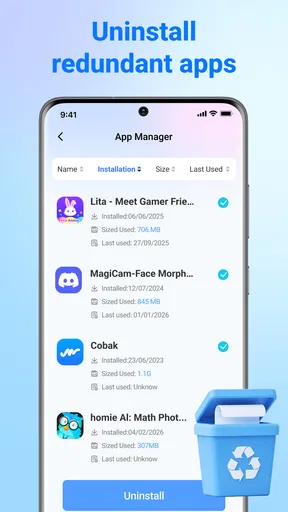
AlphaClean makes more sense when I want a separate, focused view of cleanup candidates and app organization in one utility. Its advantage is convenience and concentration. Its limitation is that a general cleaner cannot understand the personal meaning of every file as well as I can, and it may not offer the same depth as a dedicated file-management screen.
For privacy-conscious users, the right choice is to examine each screen and permission request during setup and use only the functions they understand. I would not grant access casually to any storage tool. The fact that AlphaClean has an Everyone rating and is free makes it approachable, but responsible use still depends on reviewing what I am being asked to approve and what I am about to remove.
My practical verdict after using it
After weighing the workflow against the kinds of problems it can realistically help me organize, I see AlphaClean as most useful when I want a guided review and am comfortable making the final choices myself. It is less compelling when I need precise file operations or a diagnosis of a wider device problem. My closing section brings those trade-offs together into a practical recommendation.
Who will get the most from it
I think AlphaClean is a good fit for someone whose phone has gradually become untidy and who wants a guided way to review possible clutter. It is particularly useful for people who do not enjoy navigating several storage screens or manually sorting every app and file. The combination of junk-file cleanup, storage awareness, and app organization gives the tool a clear everyday purpose.
A realistic example would be a phone used for messaging, photos, and occasional downloads. After months of normal use, the owner notices repeated media, forgotten downloads, and an app list that is difficult to manage. I would use AlphaClean to identify the obvious candidates, remove only what I recognize, then handle valuable photos and documents separately. That workflow uses the app’s convenience without handing over every decision.
It can also help before installing something large. I would scan first, review the result, and then decide whether the available space is enough. If it is not, I would look for the largest personal files or unused applications rather than assuming that a cleaner can solve the entire gap.
Who should choose another approach
I would skip AlphaClean if I mainly need advanced file operations, detailed application diagnostics, or a guaranteed solution for battery and performance problems. The built-in Android settings or a dedicated file manager may be more suitable in those cases. I would also avoid broad cleanup if I am not prepared to review personal files carefully.
Users with very old or heavily loaded phones should keep expectations realistic. The app supports Android 7.0 and later, but compatibility does not promise identical responsiveness on every device. If the system itself is unstable, I would troubleshoot that first and use a cleaner only after confirming that storage clutter is part of the issue.
The bottom line
AlphaClean is a sensible free tool for turning a vague “my phone is full” complaint into a more organized review. I like the idea of using it as a checkpoint before manual cleanup, especially when the clutter has accumulated across many ordinary activities. Its strongest quality is not that it removes everything; it is that it can make the cleanup process feel less scattered.
My main advice is to keep control of the final selection. Scan, inspect, remove a small group, and check the phone afterward. If the problem comes from personal media, one oversized application, or a system fault, use the tool responsible for that area instead. With that expectation, AlphaClean: Junk Cleaner is an approachable storage companion rather than an all-purpose repair kit, and that is a useful role for it to fill.
Ovifocus Limited has positioned the app clearly for general users, and its broad Android support, free access, and Everyone rating make it easy to try. I would recommend it to friends who want help organizing a crowded phone, with one condition: they should be willing to review what is being removed. The safest cleanup is the one that saves space without sacrificing files you still value.
Pros
- Quickly identifies cached files and other common junk.
- Simple interface makes routine cleaning easy for beginners.
- Can help free storage space on devices with limited capacity.
- Useful tools for spotting large files and unnecessary downloads.
- Cleaning suggestions can make storage maintenance more convenient.
Cons
- Some detected files may require manual review before deletion.
- Results can vary depending on device model and Android version.
- Frequent cleanup may offer limited benefits after the first scan.
- Extra features may be restricted or promoted through in-app purchases.
- Cleaning apps cannot replace careful management of personal files.
FAQs for AlphaClean: Junk Cleaner
What is AlphaClean: Junk Cleaner, and what does it do?
AlphaClean: Junk Cleaner is designed to help Android users identify and remove unnecessary files that may be taking up valuable storage space. Depending on your device and app version, it may scan for cached data, temporary files, leftover installation packages, duplicate items, and other clutter. It can also provide storage insights so you can review what is consuming space before deciding what to delete.
Is AlphaClean: Junk Cleaner safe to use on my phone?
AlphaClean can be useful when its scan results are reviewed carefully, but no cleaning app should be given unlimited trust without checking what it plans to remove. Temporary files and caches are generally safe to clear, while deleting photos, downloads, documents, or app data may be irreversible or affect an app’s settings. Always inspect the selected items and keep backups of important files before cleaning.
Can AlphaClean: Junk Cleaner improve my phone’s performance?
Removing unnecessary files may free storage and help a phone that is nearly full operate more comfortably, especially when low storage is causing warnings or preventing updates. However, AlphaClean cannot fix every performance problem, and deleting junk will not automatically make an older device feel like a new one. Battery drain, overheating, crashes, and slow apps may require system updates or other troubleshooting.
Does AlphaClean: Junk Cleaner delete personal photos, videos, or important files?
The app should not remove personal content unless those files are included in a cleaning category or selected by the user, but you should never rely on an automatic scan without reviewing its recommendations. Duplicate photos, large videos, downloads, and documents can sometimes be identified as removable items. Check file names, locations, and previews carefully, and back up anything important before confirming a cleanup.
Is AlphaClean: Junk Cleaner free, and does it contain advertisements or premium features?
Availability of features, advertisements, subscriptions, and in-app purchases can vary according to the version downloaded, your country, and the developer’s current pricing model. Before starting a scan or enabling any premium tool, review the Google Play listing and the in-app purchase screen. Pay particular attention to free-trial terms, renewal dates, cancellation rules, and whether essential cleaning features require payment.


